





@AttilaTheHorn saidTry my settings by clicking your icon on the top right,then board settings,board preferences,toggle the board size until it's to your satisfaction and then scroll down and click save preference.
@AttilaTheHorn
All these changes are wrecking my enjoyment of the site after 18 years of enjoying it. I cannot deal with the small size of my board as well as several other things.
I guess it's time to leave RHP as soon as I complete my remaining games.
I'm sure you're not completely computer ignorant.
Alleged true story:-
Someone once rung a help line to sort her computer.
The advise said "right click on the desktop"
After a while he said to her "has anything happened"
"No"
"What did you do?"
"I wrote "click" on the desktop"



@AttilaTheHorn saidSorry to hear that.
@venda
I've done all of that. These site changes have truly messed things up for me.
I use a chromebook where the screen is even smaller than a standard laptop and don't have a problem
I hope Russ can sort things out for you




@stephensmith saidCan you let me know some details about how you access the site?
@Russ
I have the same problem
[ ] Device
[ ] Operating System (Windows 7/8/9/10/11, Mac Os & version), etc)
[ ] Web Browser type and version number.
Either here on via a feedback ticket? Once I know what you are using, I can hopefully replicate the issue and get a fix available.
@stephensmith
I've just noticed your board preference is to show a small board.
Use this button ->
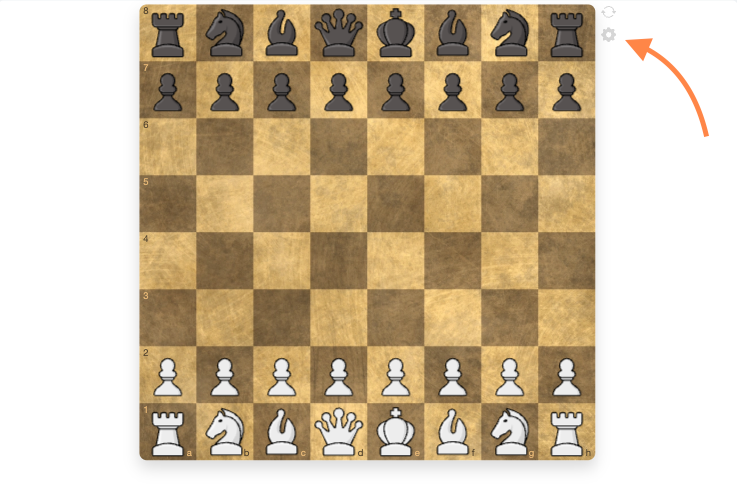
Then set this slider to max
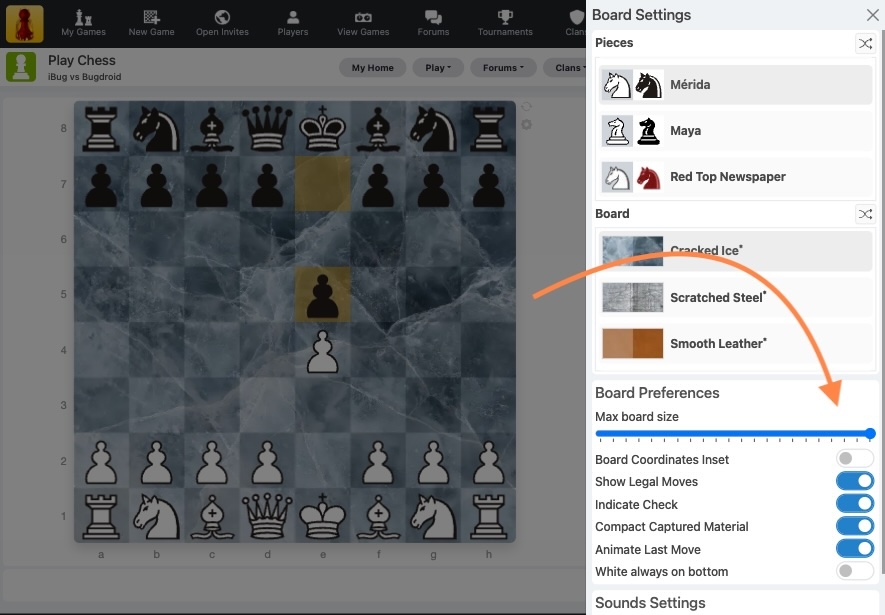
And let me know if you have the same problem.